Product

The AI Pipeline That Turns Product Data Into Digital Product Passports

From an empty schema to a published passport — Alpica DPP guides your team through every step, with audit trails, supplier onboarding, and CO₂ included.

The journey

From an empty schema to a published passport — in five steps.

A walkthrough of what your team actually does, not a pipeline diagram. Five steps, one screen at a time.

Step 01

Define your passport schema

Describe what every passport for this product category must carry — fields, types, validation rules. The AI generates a complete schema from your description; you review and refine it until it matches the regulation.
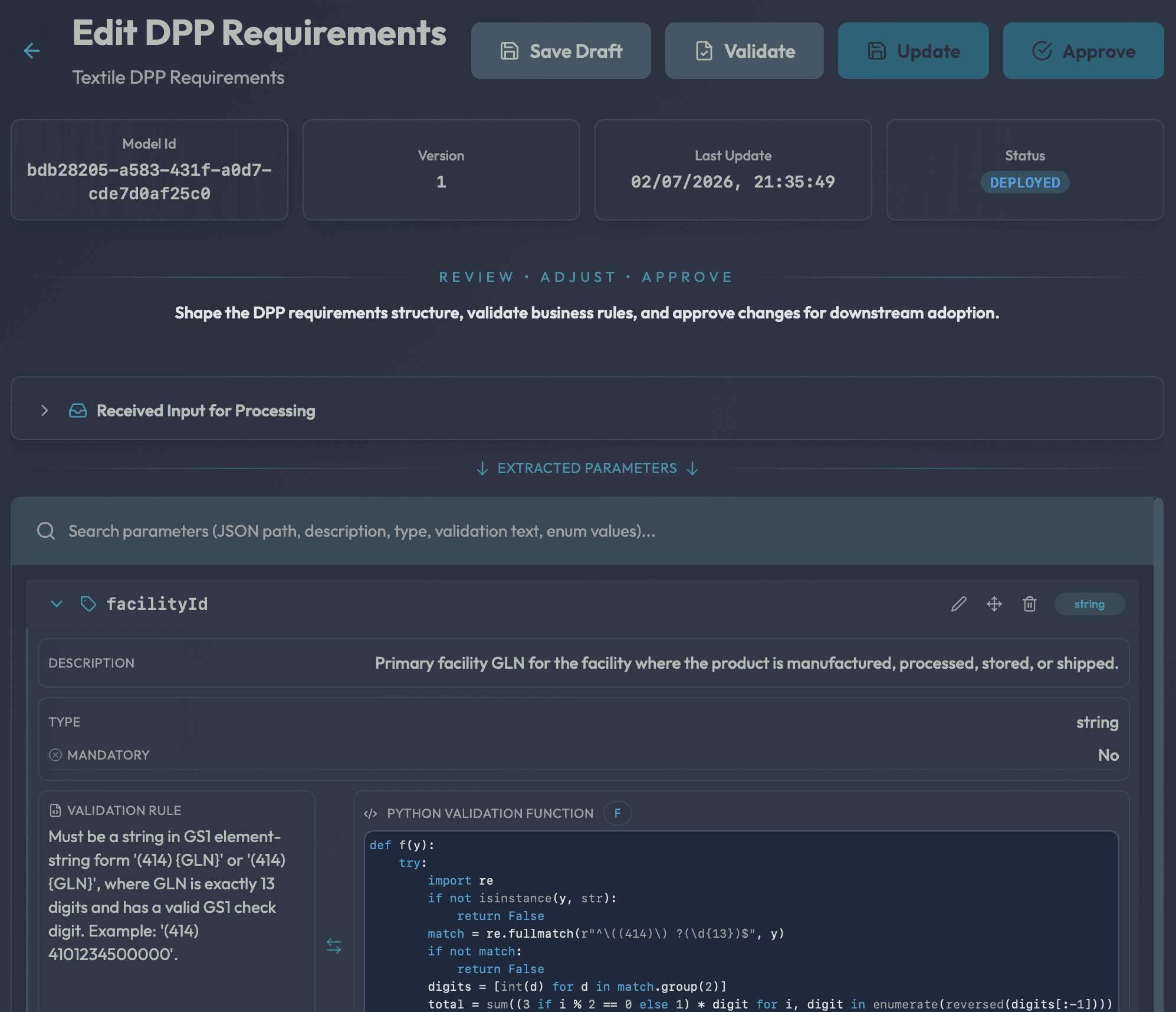
DPP Requirements editor
Hierarchical parameter tree with validation rules per field.
Step 02

Onboard your suppliers

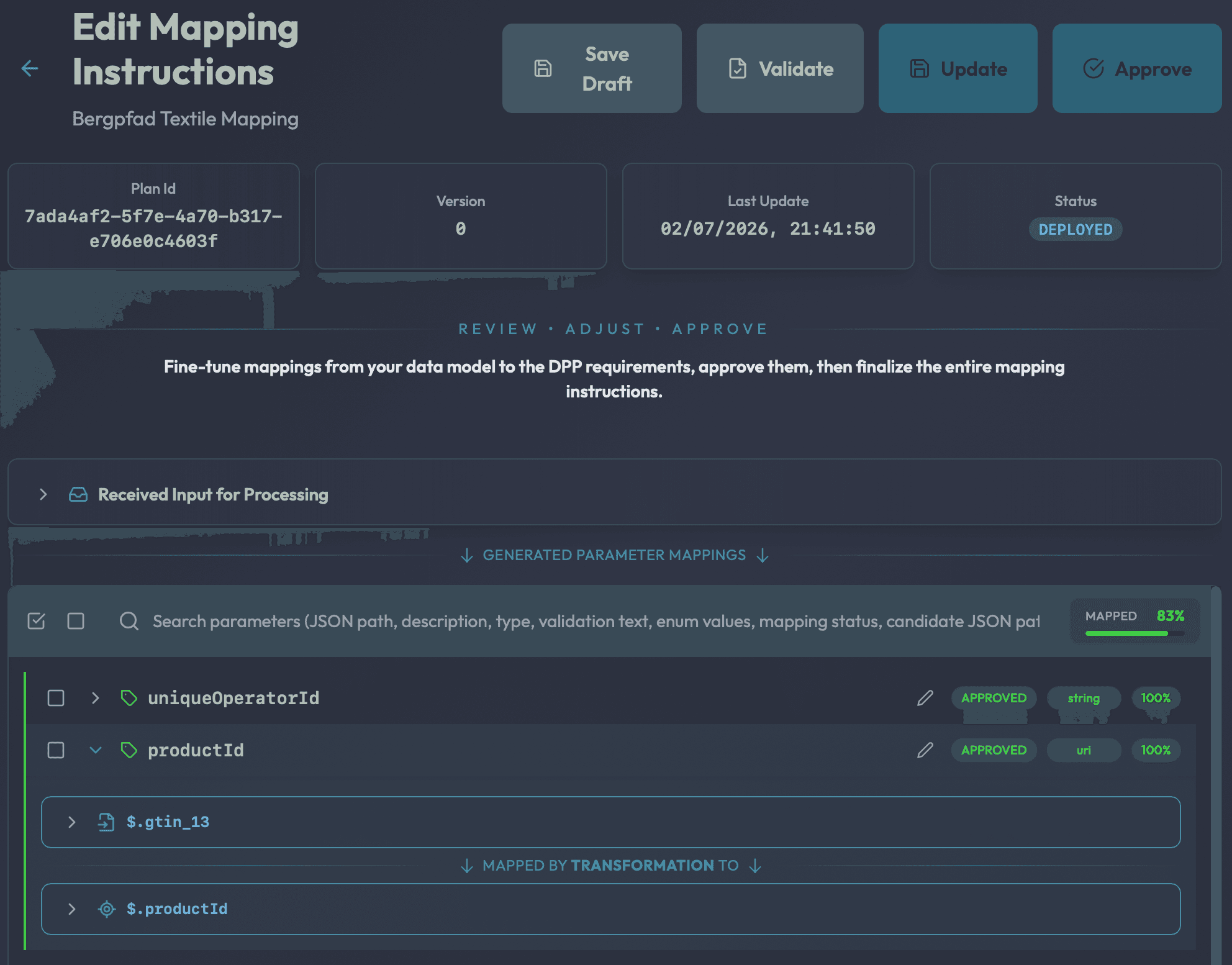
Bring in each supplier's data format — once. Alpica builds a per-supplier mapping with semantic AI matching and confidence scores. Every subsequent batch becomes passports automatically, no remapping required.

Mapping Instructions
Source-to-passport field mappings with confidence scores.
Step 03

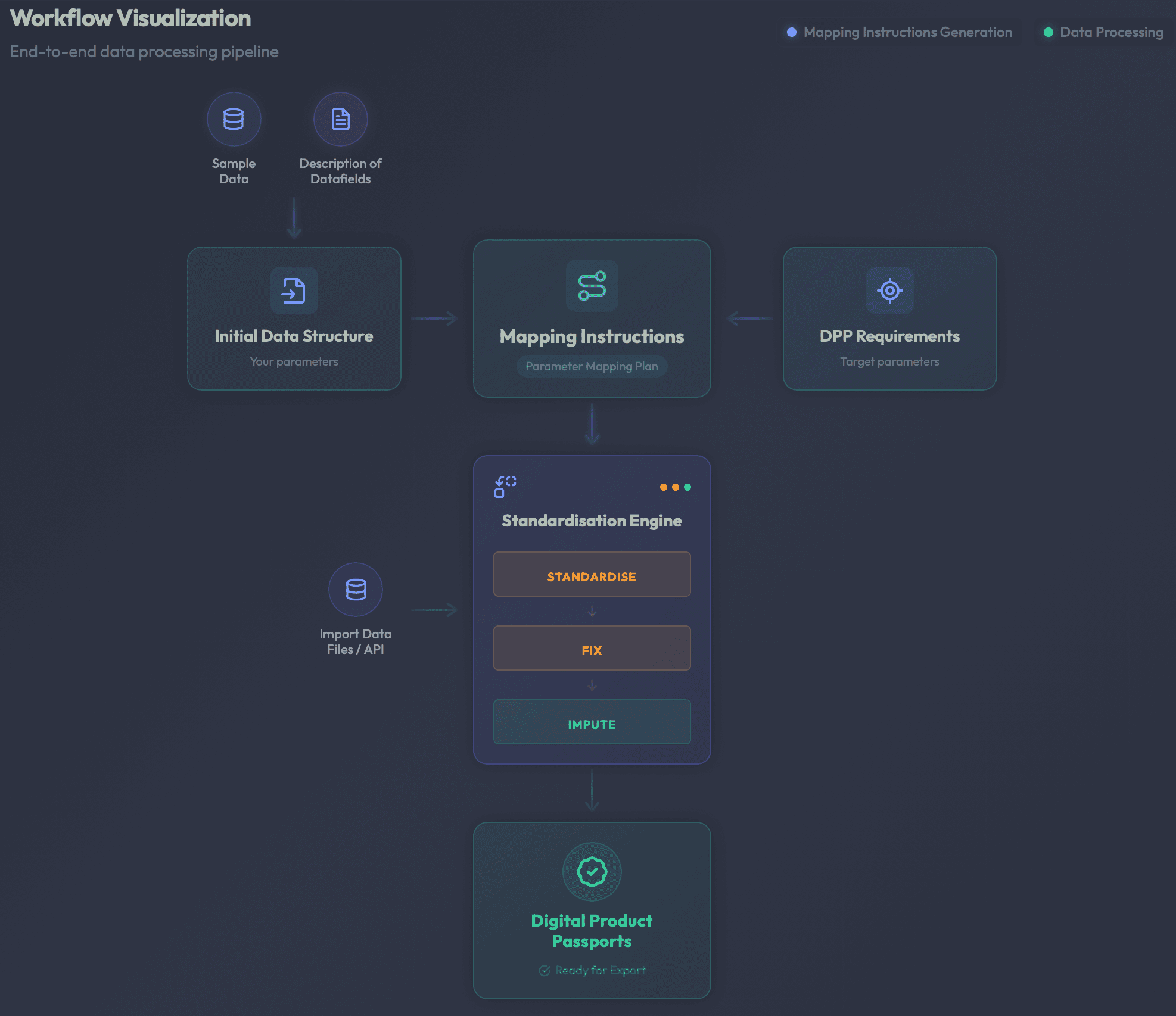
Run & monitor the pipeline

Push supplier data through three AI-powered stages: normalise to your schema, repair missing values with ML, and compute CO₂ footprint via PEFCR — 500 Monte Carlo simulations per product. Watch progress live.

Dataset Control Center
Standardise → Fix → Impute with real-time progress.
Step 04

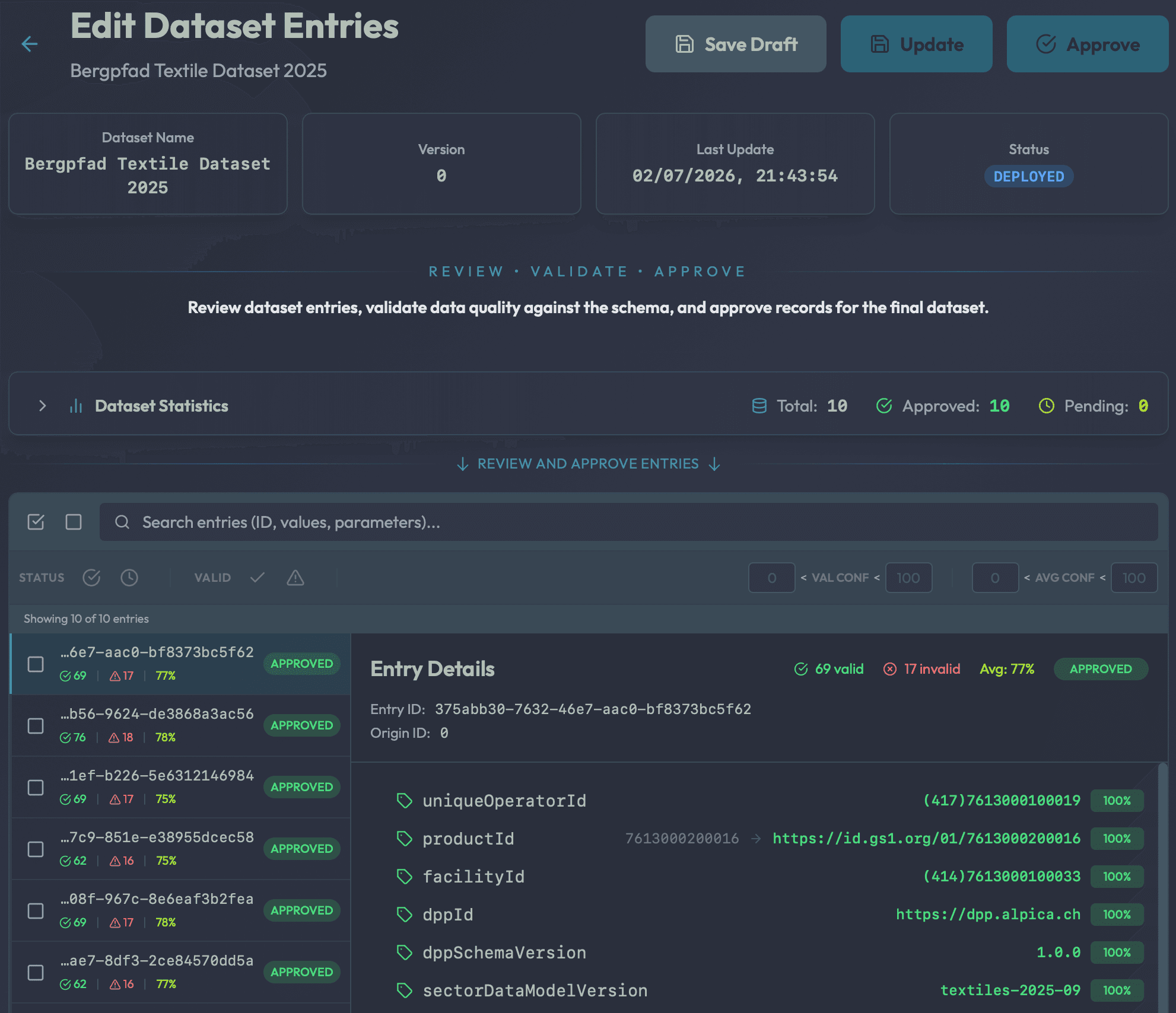
Review every value

Inspect each product's data with full provenance: where each value came from, how it was derived, how confident the AI is, whether it passes validation. Approve, edit, or dismiss individual values; batch-approve clean records.

Dataset entry editor
Per-entry review with normalised + original + confidence on every field.
Step 05

Publish & share

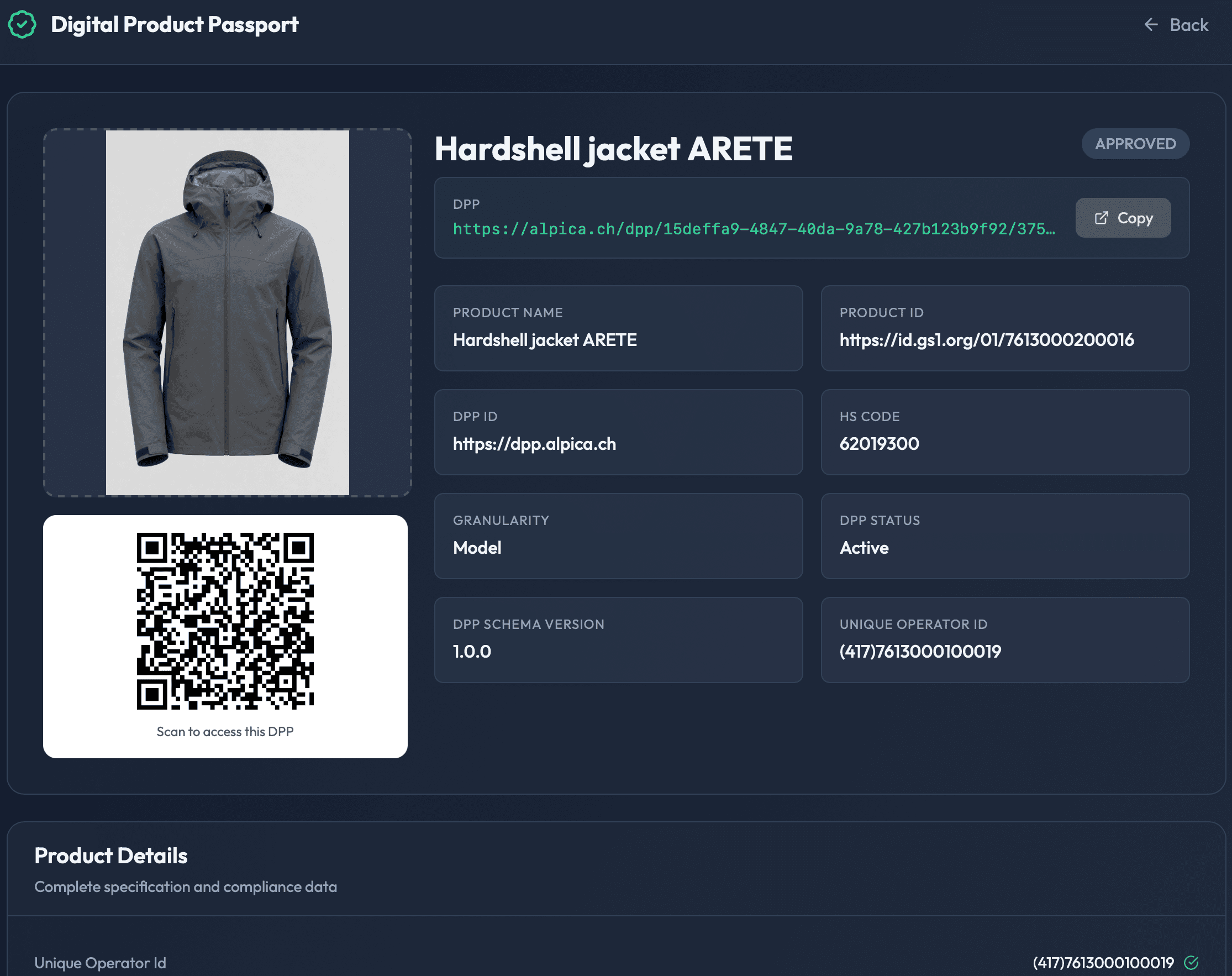
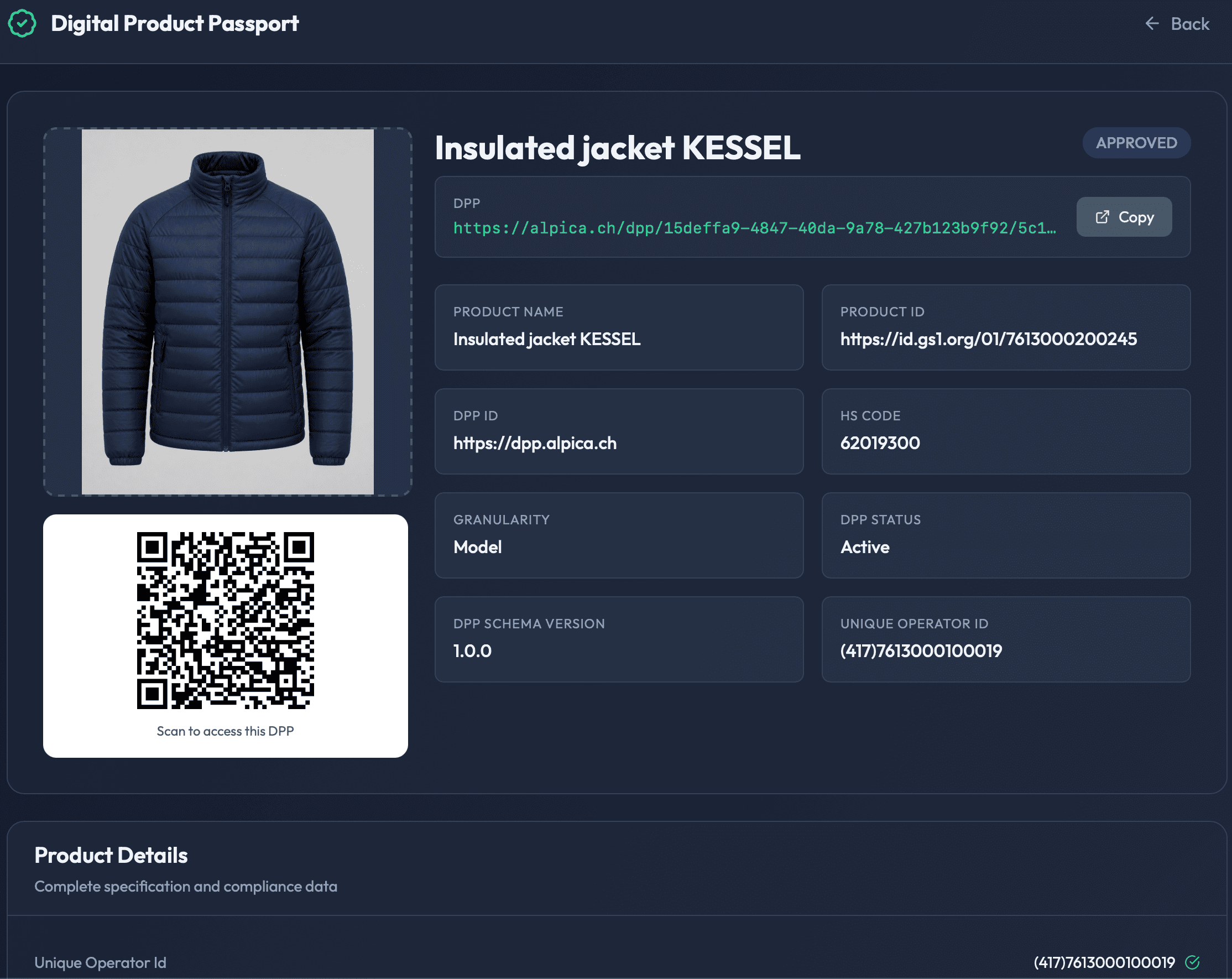
Generate passports for every reviewed record. Each one is a standalone public page with a unique URL and a printable QR code. Share with regulators, retail partners, or customers — no login required to view.

Public passport page
Scannable QR + root params + validated data tree.
Onboarding

Bring your suppliers along.

Most of your product data lives with your suppliers — in spreadsheets, ERP exports, supplier portals. Each one structures it differently, and that's the part you can't change.

Alpica DPP solves it with **per-supplier mappings.** You map a supplier's format once; every subsequent batch they send flows into passports automatically. New supplier? Add a new mapping in an afternoon. No data leaves your premises.

  • One mapping per supplier, reused on every batch
  • Ingestion via upload, SFTP, or email today — API soon
  • Optional supplier-side guidance template
  • Audit-trailed provenance from supplier file to passport value

Each supplier sends their own format

Supplier ACSVfabric_batch_2026q2.csv
Supplier BJSONmaterials_v3.json
Supplier CExcelspring_collection.xlsx
Alpica DPP · per-supplier mapping
Passports
Passports
Passports
Passports

Generate, review, and publish Digital Product Passports

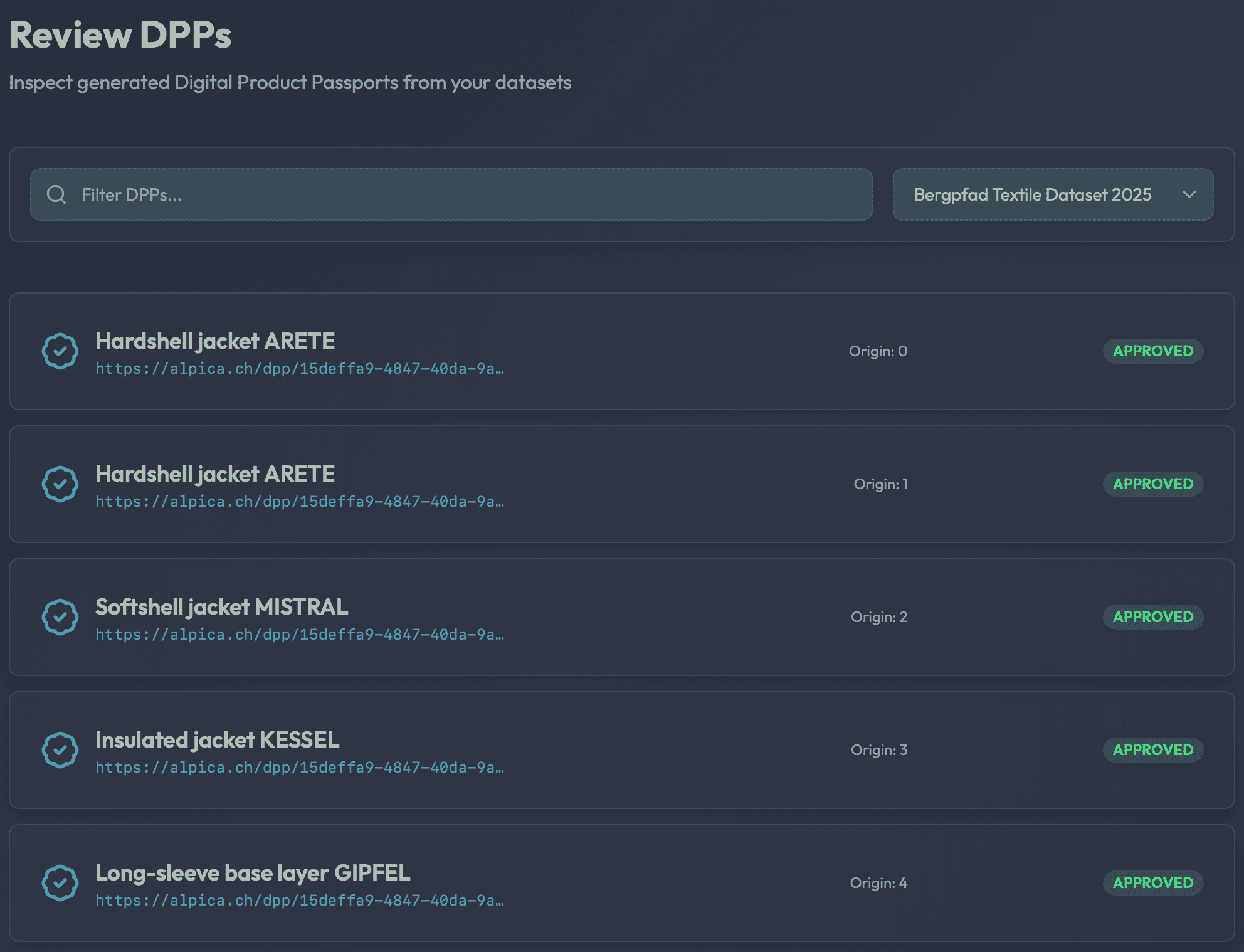
When the data is ready, “Create DPPs” generates a Digital Product Passport for every record. The DPP Review list shows each passport's product name, its unique URL, and the data entry it originated from.

Each passport renders as a standalone public page — outside the application, no login required to view. A QR code encodes the URL for printing on product labels, key fields sit in a root-parameters grid, and the full product data expands below in collapsible categories, every value flagged valid or invalid.

DPP Review list
Browse and search every generated passport by product, URL, and origin.
Public passport page
The standalone, scannable passport — QR code, root params, and full data tree.
QR-coded
Copy-to-share URL
No login to view
Valid/invalid flags
Audit & defensibility

What auditors and regulators see.

A passport isn't a static document — it's a versioned artifact. Every change is recorded: who edited what, when, and why. Every version is cryptographically hashed and chained to the next, so a regulator can verify that a published passport corresponds exactly to an approved version.

When auditors come knocking, you don't need to reconstruct anything: the version history is the documentation. Export individual passport histories as PDFs for filings; or pull the raw event log via API for your own systems.

  • Hash-chained version history per passport
  • Actor + action + timestamp + reason on every change
  • PDF export for regulatory filings
  • Review → Approve → Deploy lifecycle, defensible by design
Passport version history
dpp_a17f9c
  1. v3
    Deployed2026-05-01 · 11:48c3d14f02

    Published to alpica.ch/dpp/textile-tee-0481

    by System

  2. v2
    Approved2026-05-01 · 11:45b8e271dc

    Reviewed all 14 fields; approved for publication

    by Anna K.

  3. v1.1
    Edited2026-05-01 · 11:099d31e7af

    Edited material composition: corrected fibre ratio

    by Anna K.

  4. v1
    Generated2026-05-01 · 10:23a1f4b2c8

    Generated from supplier batch #142 (Supplier A)

    by Alpica AI

Every version · every change · hash-chained

Powered by Alpica Agents

Built-in AI assistant that knows where you are

Powered by Alpica Agents, a context-aware conversational assistant is available on every screen. It knows which page you're viewing, which artifact you're working on, and what you've done recently. Ask it to explain a validation error, walk you through the pipeline, or suggest how to fix a low-confidence mapping — it responds with help specific to your current situation.

Context-aware
Every screen
Actionable answers
Alpica Assistant
Online
Context: Step 3 — Field Mappings · 12 mappings · 3 low confidence
Why did this field fail validation?
The value "2024-31-12" doesn't match the ISO 8601 date format required by the DPP schema. The normaliser expected YYYY-MM-DD but received YYYY-DD-MM.
Which fields does the EU textile DPP require?
For textiles under ESPR delegated acts: fibre composition, origin & traceability, care & repair instructions, recycled content, CO₂e footprint, and end-of-life routing. I can pre-populate them in your schema if you'd like.
Walk me through what the Fix stage did
TabPFN analysed 2,847 records and predicted values for 134 missing fields across 12 parameters. Average confidence: 0.87. All imputed values are tagged in the audit trail.
Ask about your data pipeline...

Context-aware assistant · every screen

Deployment

On your premises. No data leaves.

Alpica DPP runs entirely within your infrastructure. Your product data, your supplier data, your CO₂ calculations — all stay where they already live.

On-premise

Deployed inside your infrastructure — your VPC, your data centre, or air-gapped.

No data egress

Product and supplier data never leaves your systems. Regulators, suppliers, and procurement teams all get the same answer.

Model-agnostic

Bring your own LLM — OpenAI, Anthropic, Gemini, or a local model. Swap providers without touching the rest of the pipeline.

Free proof of concept

Your products. The DPP schema. A real passport, free.

Send us a sample of your product data and the target DPP schema. We'll ship back a real, scannable Digital Product Passport running on your own data — QR code, validation flags, CO₂ included — before you commit to anything.

Your product data
The DPP schema
A real, scannable passport
Contact

From product data to compliant passports

See how Alpica turns your product data into Digital Product Passports. Our team delivers a free proof of concept — your source format, the DPP schema, your transformation.

  • Talk to real engineers

    Every message is answered by someone who builds the product — not a sales funnel.

  • Fast, honest replies

    Expect a thoughtful response within one business day, with clear next steps.

  • Built around your context

    We adapt scope, security, and delivery to fit your team and your data.

GDPR-alignedAccepting pilots

Tell us about your project

We'll get back within one business day.

By submitting, you agree to be contacted by Alpica regarding your enquiry. We never share your details.